
Overview
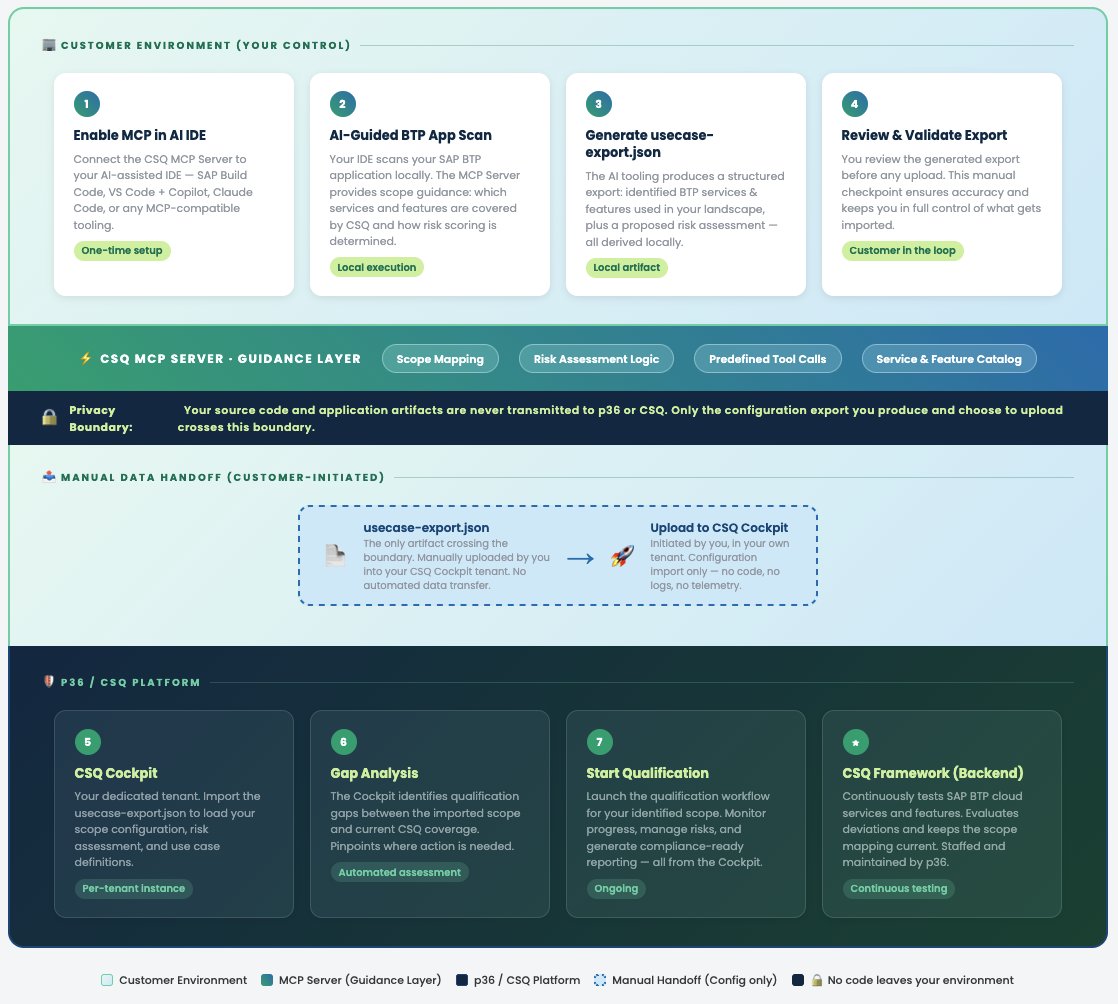
The CSQ MCP server is a tenant-scoped Model Context Protocol server that exposes your CSQ tenant’s use cases, services, features, and risk model to AI assistants. Combined with access to your application’s source, it lets an AI assistant draft a complete service risk assessment against the correct use case. You then review the draft locally and import it into the CSQ platform yourself.The CSQ MCP server is distinct from the public CSQ docs MCP
server. The docs MCP is read-only and covers general product
documentation; the CSQ MCP is authenticated, scoped to your tenant, and
operates on the actual use cases and assessments you own. The CSQ MCP server
is also read-only: it never receives source code, prompts, or generated drafts
from your AI assistant and cannot write data back to CSQ on your behalf.
The AI analysis runs in your environment, not ours. The CSQ MCP server
only provides structured tenant data — the actual reasoning is performed by
your own AI assistant (Cursor, Windsurf, Claude, etc.) using the model and
credentials you control. P36 does not see your source code or prompts.By default, the agent is instructed to write its draft to a local JSON
file that you can review, edit, and diff against the current assessment
before you import it into the CSQ platform.
Why Use It
Risk assessment values depend heavily on how a service is actually used in your application: which features are consumed, how they are implemented (standard, configuration, customization), and how critical they are to your business process. This information typically lives in your application’s source code, deployment descriptors, and architecture documents — not in CSQ. The CSQ MCP server closes that gap by bringing your tenant’s risk model next to the code in your IDE.How It Works
When an MCP-capable AI assistant is connected to both the CSQ MCP server and your application context, it can:- Read your application context to identify which SAP BTP services and features are in use.
- Resolve them against your tenant’s service catalog and target use case via the CSQ MCP server.
- Propose values for General Impact, Implementation Type, Severity, Probability, and Detectability — grounded in the actual implementation it observes — and compute the Calculated Risk using the CSQ risk formula.
- Write the draft to a local JSON file in your workspace for review.
- Once approved, import the reviewed JSON into the CSQ Cockpit yourself.
The AI output is always a recommendation. A Use Case Designer or Admin
must review every value in CSQ before activating the use case — the MCP
integration accelerates the assessment, it does not replace the sign-off.
Tool capabilities
Configuration
Add the CSQ MCP server to your AI assistant alongside any other MCP servers you use. The endpoint is tenant-specific and requires authentication.Setup + How to run
1
Obtain a tenant token
An Admin generates a CSQ MCP token for your tenant. The token determines
which use cases the AI assistant can read.
2
Connect the CSQ MCP server
Configure the server in your AI assistant using the snippet above.
Optionally also connect the CSQ docs MCP so the assistant can
resolve general product concepts in the same session.
3
Provide application context
Open your application in an MCP-capable client (Cursor, Windsurf, Claude
Code, etc.) so the assistant can read the repository, deployment descriptors
(
mta.yaml, xs-security.json, manifest.yml), service bindings, and any
architecture notes.4
Execute the MCP Starter Workflow
Depending on your IDE, run
start-usecase-discovery using the slash command or the equivalent workflow execution method available in your environment.5
Review the local JSON
Open the generated JSON file, diff it against the current assessment, and
edit any values the AI got wrong. This is the authoritative review step;
only what remains in the file will be imported into CSQ.
6
Import into CSQ
Import the approved JSON file into the CSQ Cockpit yourself. The draft
appears as a pending change for a Use Case Designer or Admin to activate.
Record any deviation from the Calculated Risk under Justification for
Override before activation.
What to Verify Before Applying
- Tenant and use case: Confirm the assistant is operating against the correct tenant and use case before importing the JSON into CSQ.
- Service coverage: Check for services bound at runtime (service keys, destinations, external integrations) that may not be visible in the repository.
- Implementation Type: Double-check any feature flagged as Customization — this directly raises the Overall Risk Class for low-impact services.
- Detectability: This often depends on your monitoring setup, which the AI may not see. Adjust manually if needed.
- Overrides: Any deviation from the Calculated Risk must be captured in the Justification for Override field in CSQ.
What the MCP Server Cannot Do
To keep the trust boundary explicit, the CSQ MCP server intentionally does not perform any of the following actions:- Read or receive your source code. The AI assistant reads your repository locally; only structured tenant catalog data and the staged-flow guidance are sent over the MCP connection.
- Read the prompts or output of your AI assistant. The MCP server is request/response-only and receives only tool input from the assistant. Your prompts, the generated draft, and the reasoning never leave your device.
- Write data back to CSQ. There is no upload, submit, or write-back tool. The approved JSON file is imported into the CSQ Cockpit by a human user, not by the server.
- Access other tenants. Each token resolves to exactly one tenant database; cross-tenant requests are rejected.
- Run commands on your local machine. The server only exposes read-only data tools and staged guidance prompts.
Related
- Risk Assessment — definitions and scoring rules the MCP server operates on
- AI Rules — public CSQ docs MCP server for general product guidance