
Overview
The Service Risk Assessment is a crucial part of the use case configuration, allowing you to evaluate and manage risks associated with the services and their features. The risk assessment consists of three key components:- General Impact Assessment: This is a high-level assessment of the service as a whole, considering its intended use and general impact.
- Intended Use definition: This defines the purpose of the service within the use case, which is essential for accurate risk assessment.
- Feature Risk Assessment: This is a detailed assessment of each feature within the service
Risk Assessment Progress
The progress of the risk assessment is indicated by a progress bar for each service and its features. The progress is calculated based on the completion of the following steps.
A use case can only be activated if the risk assessment is complete for all
services and features.
General Impact Assessment
1
Open Service Details
Click on the service name in the configuration table to open its details.
2
Edit Properties
In the Properties tab, click the Edit button, located at the
top-right.
3
Select General Impact
Choose the general impact of the service from the dropdown menu. This will
influence the risk assessment.
4
Confirm Changes
Click Save to apply the changes.
Intended Use Definition
1
Open Service Details
Click on the service name in the configuration table to open its details.
2
Edit General Impact
In the Intended Use tab, click the Edit button, located at the
top-right to select the general impact of the service.
3
Define Intended Use
Provide a clear description of the intended use of the service within the
use case. This is essential for accurate risk assessment.
4
Confirm Changes
Click Save to apply the changes.
Feature Risk Assessment
1
Open Feature Details
Click on a Feature in the configuration table to open its details.
2
Open Risk Assessment tab
Navigate to the Risk Assessment tab.
3
Edit Risk Assessment
Click the Edit button to modify the risk assessment for the feature.
4
Define Risk Parameters
Set the Implementation Type, Severity, Probability, and Detectability for
the feature.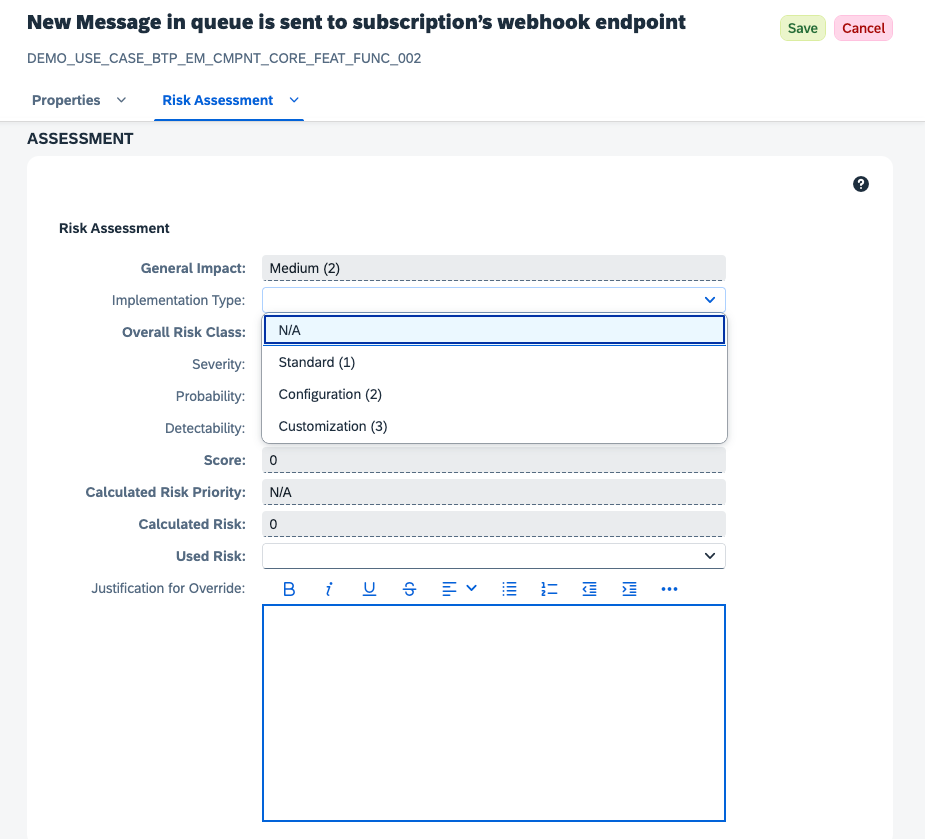
5
Confirm Changes
Click Save to apply the risk assessment changes.
Definitions
- General Impact: The overall impact of the service on the use case, which is determined during the General Impact Assessment.
- Implementation Type: The method by which the feature is implemented, affecting its risk profile.
- Overall Risk Class: A combination of the General Impact and Implementation Type, which determines the base risk level for the feature.
- Severity: The potential impact of the feature on the use case, rated from low to high.
- Probability: The likelihood of the feature causing a risk, rated from low to high.
- Detectability: The ease with which risks associated with the feature can be detected, rated from low to high.
- Score: The calculated risk score based on the above parameters, which helps prioritize risk mitigation efforts.
- Calculated Risk Priority: The overall risk priority for the feature, determined by the Score.
- Calculated Risk: The overall risk level for the feature, determined by the Score.
- Used Risk: The used risk for this feature. Defaults to the Calculated Risk, but can be adjusted to reflect the actual risk level in the use case.
- Justification for Override: A field to provide a reason for overriding the used risk, if applicable.
Risk Calculation
- General Impact
- Implementation Type
- Severity
- Probability
- Detectability
- Calculated Risk
Each service is assigned with a general impact assessment, as specified in the previous
chapters. This value applies to all features.
To ultimately calculate the risk of a specific feature, the general impact is adjusted in order
to reflect the influence of the implementation type.
The following table displays the adjustment. Mostly the general impact is used as is, except
for customized implementation type and low general impact. In that case the low impact is
adjusted to medium.
- 0 - N/A: Not applicable
- 1 - Low: The impact of service and its categories on the software application is small and consequences of a malfunction has little or no effect on normal business operations, e.g. as service functions are not required daily/are rarely used, or are e.g. used for improved user experience
- 2 - Medium: The service and the category of requirements are necessary to operate the software application. If service functionality does not work as expected respectively availability or security requirements are not entirely fulfilled, then necessary tasks in an organization cannot be performed. A continuing malfunction can seriously disrupt the productive business flow. There is no negative impact on data integrity.
- 3 - High: The requirement category is critical to operate the software application
Building Risk Assessments from Application Context
The values described above depend heavily on how a service is actually used in your application. If you would rather draft the assessment directly from your application’s source code and upload the result to CSQ for review, see the tenant-scoped CSQ MCP Server — it lets an AI assistant in your own IDE propose General Impact, Intended Use, and feature-level values grounded in the real implementation.CSQ MCP Server
Tenant-scoped MCP server for drafting risk assessments from application
context. Analysis runs in your own AI assistant; drafts are written to a local
JSON file for review before upload.