> ## Documentation Index
> Fetch the complete documentation index at: https://docs.p36-csq.com/llms.txt
> Use this file to discover all available pages before exploring further.
# Risk Assessment
> Evaluate and manage risks associated with your cloud services
## Overview
The Service Risk Assessment is a crucial part of the use case configuration, allowing you to evaluate and manage risks associated with the services and their features. The risk assessment consists of three key components:
* **General Impact Assessment**: This is a high-level assessment of the service as a whole, considering its intended use and general impact.
* **Intended Use definition**: This defines the purpose of the service within the use case, which is essential for accurate risk assessment.
* **Feature Risk Assessment**: This is a detailed assessment of each feature within the service
## Risk Assessment Progress
The progress of the risk assessment is indicated by a progress bar for each service and its features. The progress is calculated based on the completion of the following steps.
 A use case can only be activated if the risk assessment is complete for all
services and features.
## General Impact Assessment
Click on the service name in the configuration table to open its details.
In the **Properties** tab, click the **Edit** button, located at the
top-right.
Choose the general impact of the service from the dropdown menu. This will
influence the risk assessment.
Click **Save** to apply the changes.
## Intended Use Definition
Click on the service name in the configuration table to open its details.
In the **Intended Use** tab, click the **Edit** button, located at the
top-right to select the general impact of the service.
Provide a clear description of the intended use of the service within the
use case. This is essential for accurate risk assessment.
Click **Save** to apply the changes.
## Feature Risk Assessment
Click on a Feature in the configuration table to open its details.
Navigate to the **Risk Assessment** tab.
Click the **Edit** button to modify the risk assessment for the feature.
Set the Implementation Type, Severity, Probability, and Detectability for
the feature.
A use case can only be activated if the risk assessment is complete for all
services and features.
## General Impact Assessment
Click on the service name in the configuration table to open its details.
In the **Properties** tab, click the **Edit** button, located at the
top-right.
Choose the general impact of the service from the dropdown menu. This will
influence the risk assessment.
Click **Save** to apply the changes.
## Intended Use Definition
Click on the service name in the configuration table to open its details.
In the **Intended Use** tab, click the **Edit** button, located at the
top-right to select the general impact of the service.
Provide a clear description of the intended use of the service within the
use case. This is essential for accurate risk assessment.
Click **Save** to apply the changes.
## Feature Risk Assessment
Click on a Feature in the configuration table to open its details.
Navigate to the **Risk Assessment** tab.
Click the **Edit** button to modify the risk assessment for the feature.
Set the Implementation Type, Severity, Probability, and Detectability for
the feature.
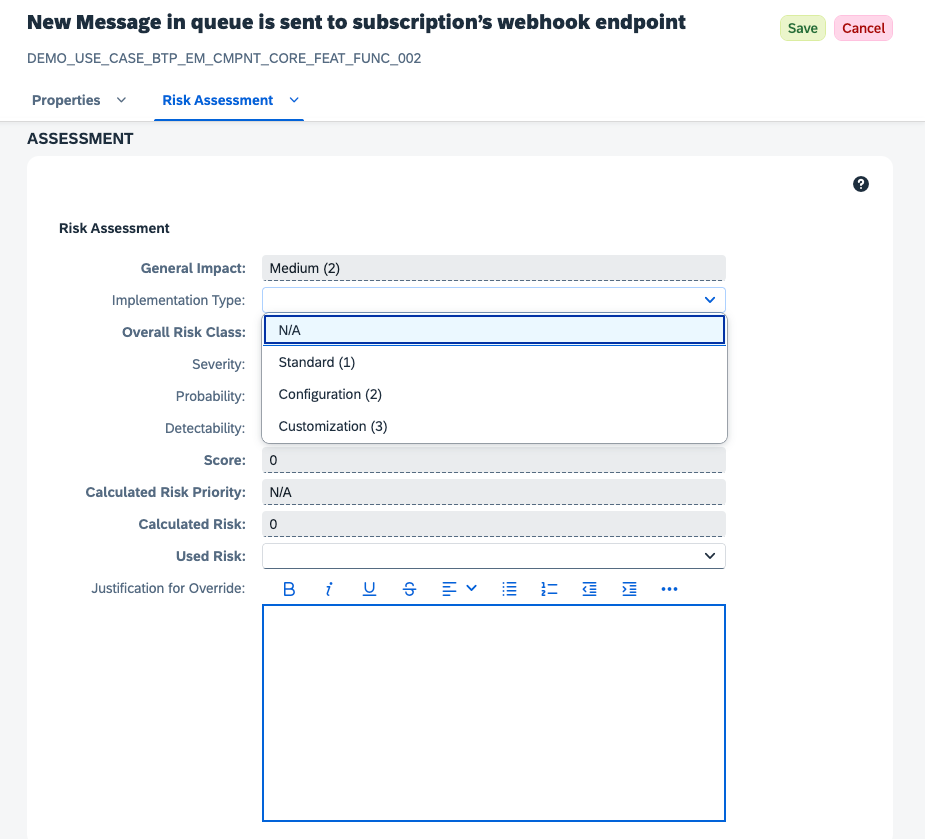 Click **Save** to apply the risk assessment changes.
## Definitions
* **General Impact**: The overall impact of the service on the use case, which is determined during the General Impact Assessment.
* **Implementation Type**: The method by which the feature is implemented, affecting its risk profile.
* **Overall Risk Class**: A combination of the General Impact and Implementation Type, which determines the base risk level for the feature.
* **Severity**: The potential impact of the feature on the use case, rated from low to high.
* **Probability**: The likelihood of the feature causing a risk, rated from low to high.
* **Detectability**: The ease with which risks associated with the feature can be detected, rated from low to high.
* **Score**: The calculated risk score based on the above parameters, which helps prioritize risk mitigation efforts.
* **Calculated Risk Priority**: The overall risk priority for the feature, determined by the Score.
* **Calculated Risk**: The overall risk level for the feature, determined by the Score.
* **Used Risk**: The used risk for this feature. Defaults to the Calculated Risk, but can be adjusted to reflect the actual risk level in the use case.
* **Justification for Override**: A field to provide a reason for overriding the used risk, if applicable.
## Risk Calculation
Each service is assigned with a general impact assessment, as specified in the previous
chapters. This value applies to all features.
To ultimately calculate the risk of a specific feature, the general impact is adjusted in order
to reflect the influence of the implementation type.
The following table displays the adjustment. Mostly the general impact is used as is, except
for customized implementation type and low general impact. In that case the low impact is
adjusted to medium.
* **0 - N/A**: Not applicable
* **1 - Low**: The impact of service and its categories on the software application is small and consequences of a malfunction has little or no effect on normal business operations, e.g. as service functions are not required daily/are rarely used, or are e.g. used for improved user experience
* **2 - Medium**: The service and the category of requirements are necessary to operate the software application. If service functionality does not work as expected respectively availability or security requirements are not entirely fulfilled, then necessary tasks in an organization cannot be performed. A continuing malfunction can seriously disrupt the productive business flow. There is no negative impact on data integrity.
* **3 - High**: The requirement category is critical to operate the software application
Service functionality must work as expected and for non-functional category the availability or security must be ensured to avoid that critical core business processes are seriously affected, data integrity is endangered or compliance rules are violated.
A workaround is not available for each circumstance
The implementation type is used to determine the gap between standard service functionality, configurable functions and new functions. Each service function is classified as follows
* **1 - Standard**: Standard product functionality – functionality can be used “out of the box”
* **2 - Configuration**: Standard functionality must be configured or standard items which are used to store configuration information must be created. For both: No additional line of code is required for realization. Example: portal service
* **3 - Customization**: Additional functionality, which is not realized in the product is required to fulfill requirements. Results in additional programming.
Severity is a measure of the possible consequences of a deviation. It can take the following values:
* **0 - N/A**: Not applicable
* **1 - Low**: The consequence will merely be a small business damage
* **2 - Medium**: The consequence will be a considerable business or image damage, but no endangering of the company
* **3 - High**: The result of the failure will be an endangering of people, a violation of law, a damage to the company's image with unforeseeable consequences or a huge business damage
Probability can take the following values:
* **0 - N/A**: Not applicable
* **1 - Low**: The failure is unlikely to happen under normal conditions; it may only occur if (several) unpredictable events happen at the same time
* **2 - Medium**: The failure is not very likely to happen under normal conditions
* **3 - High**: The failure is likely to happen under normal conditions
Detectability is the ability to discover or determine the existence, presence or fact of a deviation. It can take the following values:
* **0 - N/A**: Not applicable
* **1 - High**: The failure will be detected immediately
* **2 - Medium**: The failure may be discovered
* **3 - Low**: The failure is not likely to be discovered
The Calculated Risk is determined from the given assessment parameters via the following formula:
Calculated Risk = Overall Risk Class x Severity x Probability x Detectability
The Overall Risk Class is a combination of the General Impact and the Implementation Type. It is equal to the General Impact in all cases, except if the General Impact is low (1) and the Implementation Type is high (3), then the Overall Risk Class is medium (2).
Severity, Probability and Detectability have been described in the previous sections.
Since all four parameters take values 1, 2 or 3, the Calculated Risk ranges between 1 (very low) and 81 (extremely high). It is categorized as follows:
| Risk | Range |
| ----------- | --------- |
| Low Risk | 1 ... 10 |
| Medium Risk | 11 ... 16 |
| High Risk | 17 ... 81 |
The Calculated Risk serves as a recommendation. It can be overridden with the 'Risk Override', which will ultimately be applied during Cloud Service Qualification. If the Risk Override is not set, the Calculated Risk is used.
## Building Risk Assessments from Application Context
The values described above depend heavily on how a service is actually used in your application. If you would rather draft the assessment directly from your application's source code and upload the result to CSQ for review, see the tenant-scoped [CSQ MCP Server](/ai/CSQ-mcp-server) — it lets an AI assistant in your own IDE propose General Impact, Intended Use, and feature-level values grounded in the real implementation.
Tenant-scoped MCP server for drafting risk assessments from application
context. Analysis runs in your own AI assistant; drafts are written to a local
JSON file for review before upload.
Click **Save** to apply the risk assessment changes.
## Definitions
* **General Impact**: The overall impact of the service on the use case, which is determined during the General Impact Assessment.
* **Implementation Type**: The method by which the feature is implemented, affecting its risk profile.
* **Overall Risk Class**: A combination of the General Impact and Implementation Type, which determines the base risk level for the feature.
* **Severity**: The potential impact of the feature on the use case, rated from low to high.
* **Probability**: The likelihood of the feature causing a risk, rated from low to high.
* **Detectability**: The ease with which risks associated with the feature can be detected, rated from low to high.
* **Score**: The calculated risk score based on the above parameters, which helps prioritize risk mitigation efforts.
* **Calculated Risk Priority**: The overall risk priority for the feature, determined by the Score.
* **Calculated Risk**: The overall risk level for the feature, determined by the Score.
* **Used Risk**: The used risk for this feature. Defaults to the Calculated Risk, but can be adjusted to reflect the actual risk level in the use case.
* **Justification for Override**: A field to provide a reason for overriding the used risk, if applicable.
## Risk Calculation
Each service is assigned with a general impact assessment, as specified in the previous
chapters. This value applies to all features.
To ultimately calculate the risk of a specific feature, the general impact is adjusted in order
to reflect the influence of the implementation type.
The following table displays the adjustment. Mostly the general impact is used as is, except
for customized implementation type and low general impact. In that case the low impact is
adjusted to medium.
* **0 - N/A**: Not applicable
* **1 - Low**: The impact of service and its categories on the software application is small and consequences of a malfunction has little or no effect on normal business operations, e.g. as service functions are not required daily/are rarely used, or are e.g. used for improved user experience
* **2 - Medium**: The service and the category of requirements are necessary to operate the software application. If service functionality does not work as expected respectively availability or security requirements are not entirely fulfilled, then necessary tasks in an organization cannot be performed. A continuing malfunction can seriously disrupt the productive business flow. There is no negative impact on data integrity.
* **3 - High**: The requirement category is critical to operate the software application
Service functionality must work as expected and for non-functional category the availability or security must be ensured to avoid that critical core business processes are seriously affected, data integrity is endangered or compliance rules are violated.
A workaround is not available for each circumstance
The implementation type is used to determine the gap between standard service functionality, configurable functions and new functions. Each service function is classified as follows
* **1 - Standard**: Standard product functionality – functionality can be used “out of the box”
* **2 - Configuration**: Standard functionality must be configured or standard items which are used to store configuration information must be created. For both: No additional line of code is required for realization. Example: portal service
* **3 - Customization**: Additional functionality, which is not realized in the product is required to fulfill requirements. Results in additional programming.
Severity is a measure of the possible consequences of a deviation. It can take the following values:
* **0 - N/A**: Not applicable
* **1 - Low**: The consequence will merely be a small business damage
* **2 - Medium**: The consequence will be a considerable business or image damage, but no endangering of the company
* **3 - High**: The result of the failure will be an endangering of people, a violation of law, a damage to the company's image with unforeseeable consequences or a huge business damage
Probability can take the following values:
* **0 - N/A**: Not applicable
* **1 - Low**: The failure is unlikely to happen under normal conditions; it may only occur if (several) unpredictable events happen at the same time
* **2 - Medium**: The failure is not very likely to happen under normal conditions
* **3 - High**: The failure is likely to happen under normal conditions
Detectability is the ability to discover or determine the existence, presence or fact of a deviation. It can take the following values:
* **0 - N/A**: Not applicable
* **1 - High**: The failure will be detected immediately
* **2 - Medium**: The failure may be discovered
* **3 - Low**: The failure is not likely to be discovered
The Calculated Risk is determined from the given assessment parameters via the following formula:
Calculated Risk = Overall Risk Class x Severity x Probability x Detectability
The Overall Risk Class is a combination of the General Impact and the Implementation Type. It is equal to the General Impact in all cases, except if the General Impact is low (1) and the Implementation Type is high (3), then the Overall Risk Class is medium (2).
Severity, Probability and Detectability have been described in the previous sections.
Since all four parameters take values 1, 2 or 3, the Calculated Risk ranges between 1 (very low) and 81 (extremely high). It is categorized as follows:
| Risk | Range |
| ----------- | --------- |
| Low Risk | 1 ... 10 |
| Medium Risk | 11 ... 16 |
| High Risk | 17 ... 81 |
The Calculated Risk serves as a recommendation. It can be overridden with the 'Risk Override', which will ultimately be applied during Cloud Service Qualification. If the Risk Override is not set, the Calculated Risk is used.
## Building Risk Assessments from Application Context
The values described above depend heavily on how a service is actually used in your application. If you would rather draft the assessment directly from your application's source code and upload the result to CSQ for review, see the tenant-scoped [CSQ MCP Server](/ai/CSQ-mcp-server) — it lets an AI assistant in your own IDE propose General Impact, Intended Use, and feature-level values grounded in the real implementation.
Tenant-scoped MCP server for drafting risk assessments from application
context. Analysis runs in your own AI assistant; drafts are written to a local
JSON file for review before upload.